

AI is changing how risk, compliance, and audit teams approach their work. It’s being used to speed up regulatory summaries, suggest controls, draft policies, and map obligations across frameworks.
The benefits are clear: 60% of teams currently spend days producing audit or regulatory reports, and another 27% need weeks — time that AI can drastically reduce. Faster turnaround, fewer manual steps, and clearer connections between risks and requirements are no longer theoretical. But most teams hit a wall early: AI pilots stall, approvals get delayed, models produce results no one can trust, and teams aren’t sure who’s reviewing what.
These aren’t AI problems. They’re symptoms of a deeper issue.
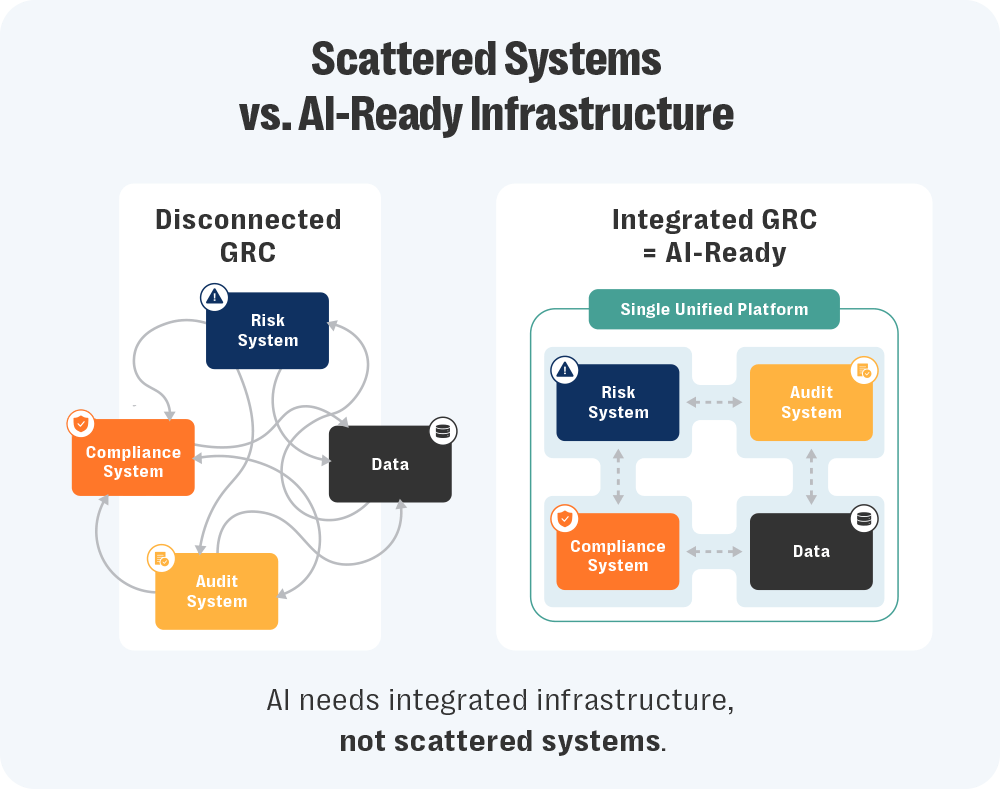
AI depends on structure. It needs access to the right data, clear workflows, and a shared understanding of how things connect. That’s hard to deliver when audit logs live in one system, policies in another, and controls in a spreadsheet someone updates once a quarter.
In that kind of setup, even small tasks — like comparing requirements across frameworks — become unreliable. It’s not just inefficient, it introduces risk. What looks like an AI issue is often a program trying to run without shared rules or consistent inputs.
So, where do you start?
In our webinar, How to Build a Scalable, Integrated GRC Program with AI-Driven Insights, Resolver’s Kristina Demollari and Yoga Huo broke down where AI is working inside risk, compliance, and audit — and where it isn’t. The message is clear: Before you scale AI, you need to integrate your GRC program. Here are four signs it’s time to make that shift.
Discover Resolver's solutions.
Signal #1: Pilots are going nowhere
You get the green light to test AI. The use case makes sense: summarize regulatory changes, map controls, draft policies. There’s early interest, maybe even excitement.
Then legal pushes back. Audit has questions. Privacy raises concerns. And the whole thing grinds to a stop.
It’s at this point where many teams stall. The pilot’s technically sound, but no one’s sure how to review it. There’s no documentation, no clear inputs, no defined handoffs. As Yoga Huo, Senior Product Marketing Manager – GRC at Resolver, put it, most proposals show up “a little bit too late, often already built and without any of the artifacts needed to evaluate the risk properly.”
And when reviewers don’t have what they need, the answer is no. Not because the idea’s flawed, but because there’s no safe way to evaluate it.
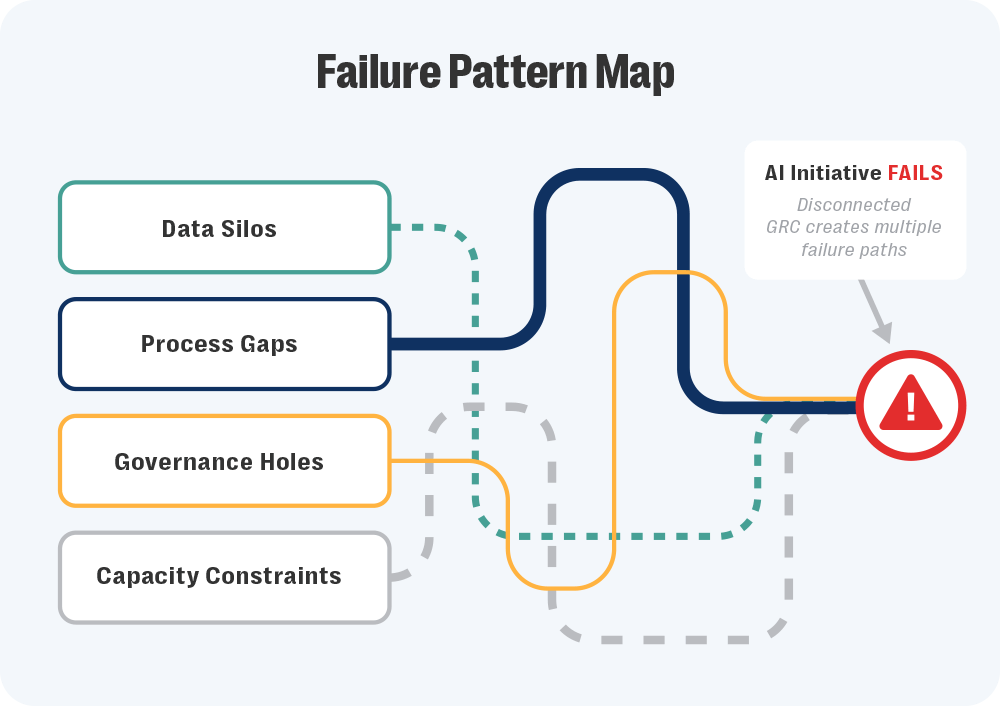
What often gets overlooked is what happens earlier. Teams struggle to build strong proposals in the first place. They don’t know where to start, which workflows matter most, or where AI would actually help. That confusion comes from limited visibility. When risk, compliance, and audit operate in silos, no one sees the whole program. Patterns stay hidden. Bottlenecks are hard to spot. Priorities don’t line up.
A disconnected program turns even simple AI experiments into high-risk decisions. An integrated GRC program gives teams the context to propose the right use cases — and gives reviewers something concrete to assess. Instead of guessing where the data came from, review teams can trace it back to known systems. They can see how AI fits into existing workflows, not something bolted on after the fact.
It gives teams more than just visibility, they get something to trust. And that trust makes things faster. They’re not rebuilding a process for every new use case because they already have shared checkpoints, review steps, and audit logs. That structure creates consistency. And that consistency makes it easier to move — not just once, but every time after.
Signal #2: Your data tells different stories
AI relies on structure. Governance does, too. When that structure breaks down, teams spend more time verifying information than using it.
It starts small: A risk register gets updated in one place but not another, or a policy change is approved but never linked to the control it affects. The mismatch usually shows up late — often after an audit report references the old version.
Regulatory updates make it worse. Even though 32% of teams cite regulatory change management as their top pain point, many still track updates manually across disconnected systems. Multiply that across teams. Privacy keeps its own dataset. Compliance runs a separate workflow. Audit can’t see either. When data can’t be traced to its source, reviews slow down and confidence drops.
Huo describes the issue as one of control: AI works best when it’s told exactly what to read. GRC data needs the same boundaries. When it’s clear what’s current, approved, or archived, results are easier to trust. When it isn’t, even basic comparisons fall apart.
That’s why integrated data has to come first. You can’t evaluate AI outputs — or human ones — without knowing where the information came from. And without that clarity, pilots don’t move forward. An integrated GRC program fixes this by aligning records across risk, compliance, and audit. Each field points back to an owned source. Updates carry through the system instead of disappearing into folders.
With that traceability in place, accuracy improves. AI stops contradicting reports because it’s reading the same verified inputs as your team. And your team stops second-guessing results, because they know exactly where they came from.
Signal #3: Manual work never ends
It’s not just frustrating, it’s systemic. Approximately 61% of compliance teams report being understaffed, working solo, or unable to grow. Manual work doesn’t end because there’s no capacity to redesign it. Instead, it gets recycled. Teams spend another week rewriting the same policy in a different format and test the same control again under a slightly new name.
None of it feels strategic. It’s just survival.
Demollari called this out, explaining that much of GRC work is “incredibly data-heavy and text-dense… regulations, policies, controls, SOC reports, evidence — all of it comes from multiple sources and in various formats,” adding that “AI can generate accurate first pass outputs for these repeatable patterns, letting teams focus on high-value decisions.”
That balance only works when the underlying process is consistent. But, right now, it isn’t. Each team builds its own templates and naming rules. One line of defense calls a control “Access Review,” another calls it “User Recertification”. AI can’t tell they’re the same thing, so it treats them as separate work. People do too.
That’s why the volume never drops: The same task is redone under different labels.
Integration changes that by giving everyone the same playbook. Shared control libraries remove duplicate effort. Common workflows mean an update in one place carries through everywhere it’s used. Once that structure exists, AI finally adds leverage. It can summarize regulatory text, compare policy versions, or flag overlaps across frameworks because it’s reading from aligned data, not improvising around inconsistencies.
The work doesn’t disappear, but it stops repeating itself. And that’s the first real sign your program is actually scaling.
 |
AI Features in Compliance Software: What GRC Teams Should Look For to be Policy-ReadyLearn how to spot the AI features that support real review, approval tracking, and audit-ready records GRC teams can stand behind. |
Signal #4: Oversight and accountability are unclear
When a control changes or a policy is approved, the trail disappears. There’s no clear record of who reviewed it, what changed, or when it was finalized.
Approvals happen in inboxes. Feedback gets buried in chat threads. The official version lives somewhere else entirely. By the time an auditor asks for proof, no one can show how the decision is made.
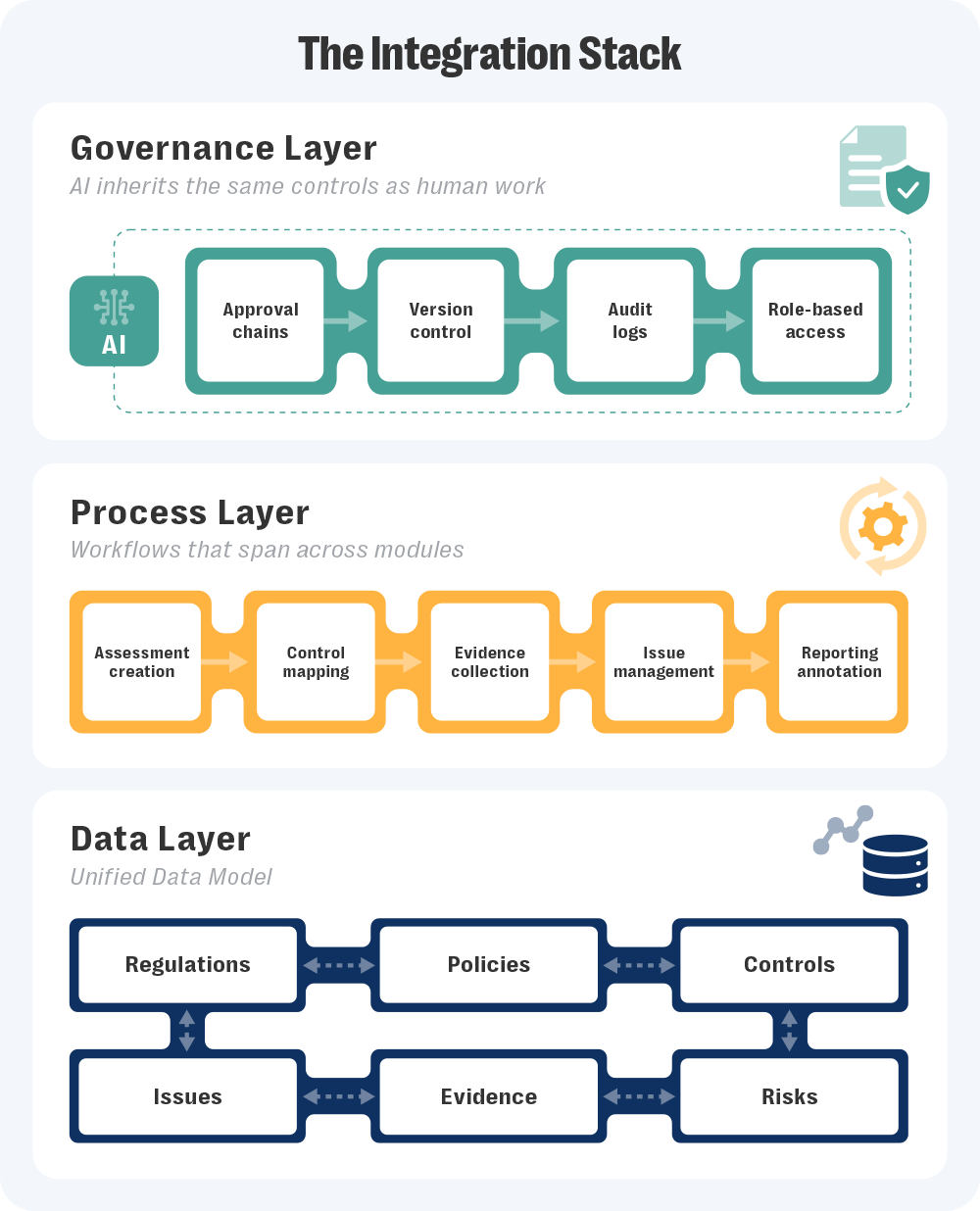
As Demollari puts it, “Review and approval steps should be part of the workflow itself, not handled through side channels like emails or Slack. AI outputs, whether it’s a drafted policy or control mapping, need to flow through the same accountability process as human work.”
And once oversight becomes invisible, accountability follows.
Huo expands on what strong oversight should look like, “What we consistently see across risk, legal, prevalency, and audit team is not actually opposition to using AI, but a lack of information, a lack of clarity, and sometimes a lack of documentation. … And when teams don’t have enough information, their safety option and their default option is very simple. They would just say no.”
Without visible review, no one can judge what’s safe. Integrated GRC programs close that gap by keeping every review, approval, and version inside the same system. Version control shows what changed and when. Maker-checker reviews record who signed off. Audit logs connect human and AI actions to the same source record.
That kind of visibility doesn’t just satisfy regulators. It builds trust inside the organization. Everyone can see how decisions were made, and that’s what real oversight looks like.
Want to see what integrated GRC looks like in action?
Teams want to adopt AI, but they’re stuck fighting the same friction points: stalled pilots, scattered data, manual work, and no visible oversight. None of those problems are technical. They’re structural.
The important distinction is that AI isn’t the finish line for GRC, it’s the stress test. When governance is fragmented, AI exposes the cracks immediately. When it’s connected, it amplifies what’s working.
Integrated GRC software gives you the structure that AI depends on. It links risks, controls, and policies so the model works from the same clean record your teams use, with review and approval steps built into every workflow. That structure keeps AI grounded, while a human-led approach — where AI drafts and suggests, but people decide — builds trust in both the technology and the program behind it.
If you’re serious about adopting AI in GRC, the first step is integrating your GRC program. Watch our webinar replay to see how Resolver’s experts approach AI adoption and governance in real programs.
Or, if you’d rather explore it firsthand, request a demo of Resolver’s Integrated GRC platform and see how integration turns AI from theory into something you can trust.
 |
AI & Automation in GRC: 5 Strategies to Turn Risk into ResilienceGet insights into how automation helps reduce manual work and improves how teams manage change. |
