Top Incident Reporting Software Reviewed for 2026
A practical look at leading incident reporting software to make reporting workflows faster, more consistent, and easier to manage.


Organizations manage a wide range of workplace incidents every year, from security events and workplace injuries to facility issues, ethics and compliance concerns, and operational disruptions. Without a centralized incident reporting system, teams often rely on disconnected spreadsheets, emails, or paper forms that slow investigations and make trend analysis nearly impossible.
Incident reporting software helps organizations capture incidents in real time, standardize investigations, automate workflows, and identify recurring risks before they become larger operational problems.
In this guide, we compare six leading incident reporting platforms to help you evaluate which solution best fits your organization’s security, facilities, and broader incident reporting needs.
What is incident reporting software?
Incident reporting software enables organizations to document, manage, and track workplace incidents through a centralized digital platform.
Instead of relying on outdated processes, employees can submit incidents using standardized workflows that capture consistent, actionable information.
Depending on the organization, incidents may include:
- Workplace injuries
- Security incidents
- Policy violations
- Employee misconduct
- Ethics complaints
- Harassment or discrimination concerns
- Property damage
- Threat assessments
- Near misses
- Compliance violations
Modern incident reporting tools also support structured investigations, evidence collection, workflow automation, reporting tracking and analytics, and executive dashboards, allowing organizations to move from simply documenting incidents to understanding trends and reducing future risk.
How incident reporting software works?
Although capabilities vary across vendors, most enterprise platforms follow a similar workflow.
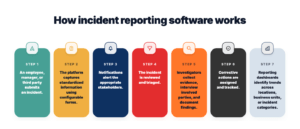
- An employee, manager, or third party submits an incident.
- The platform captures standardized information using configurable forms.
- Notifications alert the appropriate stakeholders.
- The incident is reviewed and triaged.
- Investigators collect evidence, interview involved parties, and document findings.
- Corrective actions are assigned and tracked.
- Reporting dashboards identify trends across locations, business units, or incident categories.
Advanced platforms automate routing and prioritization, reducing manual effort while improving consistency.
Top incident reporting software platforms
When comparing incident reporting software, consider how well each platform supports the full reporting process, from incident intake and routing to tracking, investigations, analytics, and follow-up. The right fit will depend on your organization’s reporting needs, workflows, and level of complexity.
Below is a closer look at six incident reporting software platforms and how their reporting experiences differ:
1. Resolver
Best for: Teams that need fast, structured incident reporting with configurable workflows and room to scale.
Resolver helps organizations make incident reporting easier and more consistent across teams and locations. Configurable forms and AI-assisted intake help users capture complete information from the start, while automated routing and notifications move reports to the right people for review and follow-up.
The platform is designed to enable teams to report quickly without lengthy implementation projects or ongoing administrative overhead. As reporting programs mature, organizations can build on that foundation with incident tracking, analytics, and investigation workflows without moving information between disconnected systems.
Key strengths include:
- AI-guided incident intake
- Automated triage and routing
- Configurable reporting workflows
- Investigation playbooks
- AI-generated case summaries
- Pattern detection and link analysis
- Incident reporting analytics
- Board-ready dashboards
- Comprehensive audit trails
Potential limitations:
- Organizations with relatively simple reporting requirements may find the platform offers more capabilities than they currently need.
- Enterprise implementations benefit from clearly defined governance and stakeholder alignment to maximize long-term value.
Pricing: Pricing varies based on your organization’s needs, requirements, and implementation scope.
2. Omnigo
Best for: Organizations managing public safety, corporate security, and operational incident reporting.
Omnigo supports incident reporting alongside public safety and security operations. Teams can document incidents, submit information from the field, and maintain reporting records within a broader security operations environment. Its combination of mobile reporting, dispatch, and reporting dashboards may be useful for organizations where incident capture is closely connected to day-to-day security activities.
Key strengths include:
- Incident reporting
- Mobile reporting
- Reporting dashboards
- Dispatch capabilities
- Security operations workflows
- Visitor management
Potential limitations:
- Organizations should assess how easily reporting forms and workflows can be adapted to their specific incident types and reporting requirements.
- Teams with highly complex or organization-specific reporting processes may need additional configuration to align the platform with existing workflows.
- Buyers should evaluate the mobile reporting experience based on how and where employees and security teams are expected to submit incident reports.
- Organizations that require anonymous incident reporting should confirm that available intake options align with their specific reporting and privacy requirements.
Pricing: Contact vendor for pricing.
3. Genetec
Best for: Organizations that want incident reporting connected to their broader physical security environment.
Genetec brings incident reporting together with video surveillance, access control, and other physical security systems. This can give security teams additional context when documenting and responding to incidents, particularly when reports relate to events captured by existing security infrastructure.
For organizations already operating within the Genetec ecosystem, connecting incident reporting with other security data can help centralize information and support a more consistent reporting process.
Key strengths include:
- Incident reporting
- Video surveillance integration
- Access control integration
- Centralized security information
- Security monitoring
- Unified physical security environment
Potential limitations:
- Organizations should assess how much configuration is required to tailor incident reporting forms and workflows to their specific processes.
- Teams prioritizing simple, rapid incident capture should evaluate whether the reporting experience fits the needs of both frequent and occasional users.
- Buyers should consider how easily incident reporting data can be standardized and consolidated across teams, locations, and incident types.
- Organizations should evaluate available reporting and analytics capabilities against their requirements for tracking incident trends and reporting performance.
Pricing: Custom pricing based on your organization’s needs.
4. Silvertrac
Best for: Security teams that prioritize mobile incident reporting and field-based documentation.
Silvertrac focuses on helping security personnel document incidents and other activity from the field. Its mobile-first approach allows officers to capture information closer to when and where an event occurs, helping reduce delays between an incident and the resulting report.
For organizations with distributed security personnel, mobile reporting, real-time notifications, and patrol documentation can help improve communication between field teams and supervisors while keeping incident records centralized.
Key strengths include:
- Mobile incident reporting
- Real-time field reporting
- Photo and incident documentation
- Real-time notifications
- Patrol documentation
- GPS-enabled field operations
Potential limitations:
- Organizations should assess whether reporting workflows can be adapted to support the full range of incident types they need to capture.
- Teams with complex reporting requirements may need to evaluate the level of configuration available for forms, fields, notifications, and escalation workflows.
- Buyers should consider whether reporting processes can be standardized effectively across different teams, sites, and operational environments.
- Organizations with advanced analytics needs should evaluate whether available dashboards and reporting capabilities provide enough flexibility to analyze trends and turn incident data into actionable insights.
Pricing: Contact vendor for pricing.
5. TrackTik (Trackforce)
Best for: Security organizations with distributed teams that need mobile incident reporting alongside workforce operations.
TrackTik, part of Trackforce, combines mobile incident reporting with tools for managing security personnel in the field. Security teams can document incidents as part of their day-to-day workflows while linking reports to patrol, dispatch, and other operational activities.
For organizations with large or distributed security workforces, this approach can help make incident capture part of existing field processes and give supervisors more timely visibility into reported events.
Key strengths include:
- Mobile incident reporting
- Real-time field reporting
- Centralized incident records
- Scheduling and dispatch
- Patrol management
- Operational dashboards
Potential limitations:
- Organizations should assess whether incident reporting workflows can be configured to accommodate their specific reporting processes and incident types.
- Teams should evaluate how easily occasional users, beyond day-to-day security personnel, can submit and track incident reports.
- Buyers with complex reporting requirements should consider whether available forms, routing, notifications, and escalation options provide enough flexibility.
- Organizations with advanced analytics needs should assess whether reporting capabilities provide sufficient visibility into incident trends across teams, sites, and incident categories.
Pricing: Contact vendor for pricing.
6. Accruent FAMIS 360
Best for: Organizations that need to manage facility-related incidents alongside maintenance, inspections, assets, and work orders.
FAMIS 360 is a facility and asset management platform with an Incidents module that allows teams to record and track issues occurring across facilities or properties. Organizations can standardize incident information using configurable fields while keeping related facility data centralized.
For organizations managing multiple buildings or properties, FAMIS 360 can connect incident reporting with broader facilities workflows such as inspections, maintenance, work orders, and asset management.
Key strengths include:
- Facility incident tracking
- Configurable incident fields
- Inspections
- Work order management
- Asset tracking
- Reporting and tracking
Potential limitations:
- Organizations should assess whether incident reporting forms and workflows can be tailored to the range of incidents they need to capture.
- Teams with more complex reporting processes should evaluate the flexibility available for routing, notifications, escalations, and follow-up.
- Buyers should consider whether reporting and analytics capabilities provide enough visibility into incident patterns and trends across sites and teams.
- Larger organizations should evaluate how effectively the platform can standardize incident reporting across multiple locations, departments, and reporting requirements.
Pricing: Custom pricing available based on organization’s needs.
Incident reporting software at a glance
Choosing the right incident reporting software depends on your organization’s reporting requirements, investigation processes, and long-term operational goals.
Here’s a quick comparison of leading platforms.
|
Platform |
Best for |
Strengths |
Limitations |
|
Resolver |
Enterprise security teams that need standardized incident reporting, response workflows, and visibility across locations and incident types |
Centralized incident intake and reporting, configurable forms and workflows, automated notifications and escalation, incident tracking, investigation support, dashboards and analytics, and centralized data for identifying trends and improving response |
Enterprise deployments may require upfront process alignment and configuration to standardize reporting across teams and locations. |
|
Omnigo |
Organizations managing incident reporting across public safety and security operations |
Incident reporting, mobile reporting, reporting dashboards, dispatch capabilities, security operations workflows, and visitor management |
Organizations should assess how easily reporting forms and workflows can be adapted to their specific incident types and requirements, as well as whether mobile and anonymous reporting options align with their needs. |
|
Genetec |
Organizations that want incident reporting connected to their broader physical security environment |
Video surveillance integration, access control integration and associated incident reporting, centralized security information, and security monitoring |
Teams should evaluate how much configuration is needed to tailor incident reporting workflows and whether the reporting experience is simple enough for both frequent and occasional users. |
|
Silvertrac |
Security teams that prioritize mobile incident reporting and field-based documentation |
Mobile incident reporting, real-time field reporting, photo and incident documentation, real-time notifications, patrol documentation, and GPS-enabled field operations |
Organizations with complex reporting requirements should assess the flexibility of forms, notifications, escalations, and workflows, as well as the depth of analytics for identifying incident trends. |
|
TrackTik (Trackforce) |
Security organizations with distributed teams that need mobile incident reporting alongside workforce operations |
Mobile incident reporting, real-time field reporting, centralized incident records, scheduling and dispatch, patrol management, and operational dashboards |
Teams should consider how easily users beyond day-to-day security personnel can submit and track incident reports, particularly when reporting needs span multiple sites or user groups. |
|
Accruent FAMIS 360 |
Organizations that need to document facility-related incidents and operational issues across properties or locations |
Facility incident tracking, configurable incident fields, inspections, work order management, asset management, and reporting and analytics |
Organizations should evaluate whether incident reporting workflows can support the range of incidents they need to capture and whether reporting and analytics provide sufficient visibility across locations, teams, and incident types. |
Key features to look for in incident reporting software
Not every incident reporting platform offers the same level of functionality. Organizations should evaluate software based on both current requirements and future operational maturity.
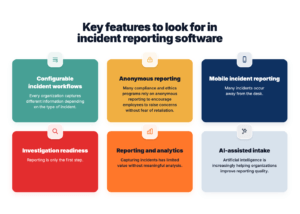
Configurable incident workflows
Every organization captures different information depending on the type of incident.
Look for configurable forms that support:
- Multiple incident types
- Required fields
- Conditional logic
- Supporting documentation
- Evidence attachments
- Mobile-friendly reporting
Flexible workflows reduce incomplete submissions while ensuring consistent data collection.
Anonymous reporting
Many compliance and ethics programs rely on anonymous reporting to encourage employees to raise concerns without fear of retaliation.
Anonymous incident reporting software should support:
- Secure reporting portals
- Anonymous follow-up communication
- Confidential case handling
- Role-based permissions
These capabilities can improve reporting rates while supporting regulatory compliance.
 |
Top Security Incident Management Software Reviewed for 2026
Explore the leading security incident management solutions in 2026 that help teams report incidents faster, investigate smarter, and improve risk visibility. |
Mobile incident reporting
Many incidents occur away from a desk.
Security officers, facilities teams, healthcare workers, and field employees should be able to submit reports directly from a mobile device.
Mobile reporting helps organizations:
- Capture incidents faster
- Reduce forgotten details
- Upload photos immediately
- Improve reporting accuracy
- Increase adoption among frontline staff
Investigation readiness
Reporting is only the first step.
Organizations should look for software that makes it easy to transition from incident reporting into structured investigations without duplicating information or manually recreating cases.
This becomes increasingly important for organizations managing employee misconduct, security incidents, fraud, or workplace violence investigations.
Reporting and analytics
Capturing incidents has limited value without meaningful analysis.
Look for dashboards that help answer questions like:
- Which locations generate the most incidents?
- Are reporting volumes increasing?
- Which incident categories present the highest operational risk?
- How quickly are incidents resolved?
- Are corrective actions being completed?
Advanced analytics help leaders identify patterns before they become larger organizational issues.
AI-assisted intake
Artificial intelligence is increasingly helping organizations improve reporting quality.
AI-assisted intake can:
- Guide users through reporting forms
- Reduce incomplete submissions
- Recommend classifications
- Prioritize cases
- Summarize incident narratives
- Support investigators with administrative tasks
Rather than replacing investigators, AI helps teams spend less time on documentation and more time resolving incidents.
How to choose the right incident reporting software?
Choosing incident reporting software shouldn’t be based solely on feature checklists. Instead, organizations should evaluate how well a platform supports their reporting processes today while providing room to mature over time.
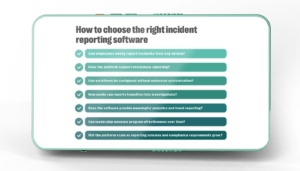
Consider questions such as:
- Can employees easily report incidents from any device?
- Does the platform support anonymous reporting?
- Can workflows be configured without extensive customization?
- How easily can reports transition into investigations?
- Does the software provide meaningful analytics and trend reporting?
- Can leadership measure program effectiveness over time?
- Will the platform scale as reporting volumes and compliance requirements grow?
Organizations that answer these questions early are more likely to choose software that continues delivering value as their programs mature. The City of Pickering is one example. Facing fragmented incident reporting and limited visibility into organizational trends, the city partnered with Resolver to centralize reporting across departments. The result was better access to actionable data, improved visibility into incidents, and more informed decision-making.
It’s a reminder that the right platform should do more than streamline reporting: it should turn incident data into meaningful operational insight.
How Resolver turns incident reporting into actionable insights?
Capturing an incident report is only the first step. Organizations also need a consistent way to track reports, analyze incident data, and use what they learn to make better decisions.
Resolver brings incident reporting into a centralized workflow, helping teams capture complete, structured information from the start. AI-assisted intake can guide users through the reporting process, while configurable workflows, automated routing, and notifications help ensure reports reach the right people for follow-up.
Centralized reporting also makes incident data easier to analyze. Teams can identify patterns and trends across locations, incident types, and time periods, providing security leaders with clearer information to guide resource allocation, training, and operational decisions.
“I think Resolver is an amazing platform [because it’s] scalable and insight driven. It’s not a platform where you just log your incident reports. It’s for people who want to move beyond basic reporting to more proactive risk management. I think Resolver will get you there without your team feeling that they need to be an IT expert for it.”
Adnan Salam, Assistant Manager of Public Safety, Humber Polytechnic
That ability to turn incident reports into useful insights can have a measurable impact. Catholic Relief Services (CRS), for example, replaced outdated manual reporting processes with Resolver to improve incident reporting and analysis across its global operations. Within the first two years, incident reporting increased 239 percent, while improved data analysis helped CRS make more informed decisions about recruitment, training, and operational strategies. Its experience demonstrates how making reporting more accessible and incident data easier to analyze can support better decision-making as a security program grows.
For organizations looking to strengthen reporting without adding unnecessary complexity, Resolver provides a foundation for consistent incident capture, tracking, and analysis, while remaining flexible enough to support more sophisticated workflows as reporting needs evolve.
Build a stronger incident reporting program
Effective incident reporting is about more than documenting events. It’s about giving your organization the information it needs to investigate issues quickly, identify recurring risks, improve compliance, and make more informed operational decisions.
As reporting requirements become more complex, organizations benefit from solutions that connect incident intake with investigations, analytics, and measurable program performance.
If you’re evaluating enterprise incident reporting software, explore Resolver’s Incident Management Showcase to see how AI-guided intake, configurable workflows, advanced investigations, and executive reporting work together in a modern incident management platform.
Frequently asked questions
We’re a small team. Can’t we just use spreadsheets to track incidents?
You certainly can, and many organizations start that way. But as reporting volumes grow, spreadsheets become harder to manage. They don’t automatically notify the right people when a serious incident occurs, make collaboration difficult, and provide little visibility into recurring trends.
Dedicated incident reporting software simplifies the process by capturing information in a consistent format, routing reports automatically, and keeping every update in one place. Instead of spending time chasing down information, your team can focus on investigating incidents and preventing them from recurring.
My team is used to paper forms and email. How do I get them to adopt new software?
Imagine a security officer finishing a late-night shift after responding to an incident. Instead of returning to the office to complete paperwork, they can submit a report from their phone while the details are still fresh. Photos, witness information, and supporting documents are attached immediately, and the appropriate managers are notified automatically.
That’s the kind of experience that encourages adoption. The easier reporting becomes, the more likely employees are to use the system consistently. When evaluating software, look for intuitive interfaces, mobile accessibility, and workflows that reduce administrative work rather than adding to it.
We only need incident reporting today. Why should we consider incident management capabilities?
It’s a fair question. Many organizations begin by looking for a simple way to replace spreadsheets or paper forms.
The challenge comes after the report is submitted. Who investigates it? How are corrective actions tracked? Can leadership identify recurring issues across multiple locations? If those processes happen in separate systems, information becomes fragmented and valuable context can be lost.
Choosing a platform that can evolve from incident reporting into investigations and analytics allows your organization to mature without replacing software as your needs grow.
Can employees report incidents anonymously?
Absolutely, and in many organizations, anonymous reporting is essential.
Consider an employee who witnesses workplace misconduct but worries about retaliation. If they don’t feel safe reporting the issue, leadership may never become aware of the problem. Anonymous reporting gives employees a secure way to raise concerns while protecting their identity, helping organizations uncover issues earlier and foster a stronger reporting culture.
Many enterprise platforms also allow investigators to communicate with anonymous reporters via secure messaging, enabling them to gather additional information without compromising confidentiality.
How long does it typically take to implement incident reporting software?
The answer depends on how your organization plans to use the platform.
A team replacing manual reporting with standardized digital forms may be able to get started relatively quickly. Larger enterprise organizations often take a phased approach, configuring workflows, integrating with existing systems, and training different departments over time.
The best implementations focus on long-term adoption rather than simply going live. Taking the time to build workflows that reflect how your organization actually operates often leads to better reporting quality and stronger outcomes over the long run.
How do I know when it’s time to move beyond basic reporting tools?
There’s usually a tipping point.
Maybe leadership is asking for trend reports that take hours to compile. Maybe incidents are getting lost in email chains, or investigators are manually copying information between systems. Perhaps compliance audits are becoming more frequent, and producing documentation is increasingly time-consuming.
When reporting starts creating more administrative work than operational insight, it’s often a sign that your organization has outgrown manual processes. Modern incident reporting software helps centralize information, automate workflows, and provide the visibility needed to make faster, more informed decisions.