Top AI Risk Management Software for Smarter Risk Analysis
Explore leading AI risk management software and learn how the AI capabilities help teams assess, monitor, and respond to risk more effectively.


Risk teams are under growing pressure to make sense of an increasingly complex risk environment. Operational risks are evolving, risk data is often fragmented across business units and systems, assessments remain time-consuming, and boards and executives expect a clearer, more timely view of the organization’s risk posture.
AI risk management software can help close that gap, but the value goes beyond automating manual tasks. For financial institutions and other complex enterprises, AI can help teams connect risk signals across the business, identify patterns and trends that may be difficult to see in isolation, and give teams greater confidence in the information behind strategic decisions.
However, not every platform delivers that value in the same way. Some vendors have added AI-powered assistants to existing governance, risk, and compliance (GRC) platforms, while others embed AI into specific workflows, such as risk assessments, control management, and regulatory analysis. The right solution should help your team reduce manual effort while building a more connected and accurate understanding of risk across the organization.
This guide compares leading AI risk management software solutions, the capabilities that matter most, and what to consider when choosing the right solution for your risk program.
Discover Resolver's solutions.
AI risk management software at a glance
As AI capabilities continue to evolve, buyers face an increasingly crowded market. The comparison below provides a high-level overview of leading enterprise platforms and their approaches to AI-enabled risk management.
|
Software |
Best for |
Key AI Capabilities |
Limitations |
|
Resolver |
Organizations that need connected visibility across risks, controls, events, issues, assessments, and remediation |
AI-assisted risk and control gap analysis, control recommendations, duplicate risk/control detection, risk assessment support, regulatory change analysis support, and connected executive reporting |
Best suited for risk teams looking to modernize enterprise or operational risk workflows; may be more than needed for teams looking for a standalone AI assistant or simple risk register. |
|
LogicGate |
Organizations that prefer highly configurable GRC workflows |
AI workflow assistance, document summarization, recommendations |
Requires significant configuration to maximize AI capabilities. AI is focused more on workflow efficiency than advanced enterprise risk intelligence. |
|
OneTrust |
Organizations managing privacy and compliance programs |
Regulatory monitoring, AI insights, automation |
Organizations looking for comprehensive enterprise risk management may find OneTrust more specialized toward privacy, compliance, and AI governance than broader ERM workflows. |
|
LogicManager |
Organizations building structured enterprise risk management programs |
AI-supported risk analysis and recommendations |
AI capabilities continue to mature across the platform. Advanced automation and regulatory intelligence are less extensive than some competitors. |
|
Riskonnect |
Organizations managing operational risk across multiple business functions |
Predictive analytics, reporting insights, automation |
AI functionality varies by module and deployment. Organizations should verify which capabilities are included in their implementation. |
|
ServiceNow GRC |
Organizations already using the broader ServiceNow ecosystem |
Generative AI assistance, workflow automation, search |
AI delivers the greatest value within the broader ServiceNow ecosystem. Implementation may be more complex for organizations seeking a dedicated GRC solution. |
Use this comparison as a starting point, then explore each platform in more detail to understand how its AI capabilities align with your organization’s risk management goals, regulatory requirements, and operational priorities.
What is AI in risk management?
AI in risk management refers to the use of artificial intelligence to help organizations identify, assess, monitor, and respond to risk more efficiently.
Rather than replacing established risk processes, AI supports risk teams by analyzing large volumes of information, identifying patterns, reducing repetitive work, and surfacing insights that may be difficult to find through manual review alone.
Common applications include:
-
Identifying duplicate or overlapping risks and controls
-
Summarizing assessments and supporting documentation
-
Detecting gaps in control frameworks
-
Analyzing regulatory requirements
-
Surfacing emerging risk signals and trends
-
Recommending controls or mitigation actions
-
Connecting related information across risks, incidents, issues, and assessments
AI-powered risk management vs. AI governance
Although these terms are sometimes used interchangeably, they solve different business challenges.
|
AI Risk Management |
AI Governance |
|
Uses AI to improve risk management workflows |
Governs how AI models are developed and used |
|
Supports risk identification, assessments, controls, and reporting |
Manages AI ethics, transparency, accountability, and compliance |
|
Helps risk professionals work more efficiently |
Helps organizations manage AI itself as a business risk |
|
Typically owned by enterprise risk or GRC teams |
Typically owned by compliance teams, often with input from legal, risk, IT, and other stakeholders |
Many organizations ultimately need both, but they’re separate technology decisions.
How does AI risk management software work?
AI risk management software combines traditional risk management capabilities with AI to help teams get more value from the data and workflows they already use.
These platforms typically work with enterprise risk information such as risk registers, controls, assessments, incidents, policies, regulatory requirements, audit findings, and operational data.
AI can then help analyze and connect that information across workflows. For example, it may identify similar risks across business units, highlight missing controls, summarize lengthy assessments, recommend relevant controls, or surface changes that warrant further review.
The goal is not to automate risk decisions entirely. AI provides analysis and recommendations, while risk professionals maintain the context, oversight, and judgment needed to make final decisions.
Signs you need AI risk management software
Many organizations begin with spreadsheets, disconnected systems, or traditional GRC platforms. While those approaches may work initially, growing operational complexity often creates inefficiencies that AI can help address.
Common signs include:
- Risk assessments take weeks to complete because teams manually gather information from multiple sources
- Different business units are assessing the same risks differently, making enterprise-level reporting difficult to trust
- Teams spend more time documenting risks than analyzing them
- Open remediation actions are hard to prioritize because teams lack a clear view of which issues create the most risk exposure.
- Control libraries contain overlapping or outdated controls, making them difficult to maintain
- Regulatory changes require extensive manual reviews across policies and procedures.
- Executives request reports that take days to compile
- Investigators, auditors, and risk managers work in disconnected systems with limited visibility
- Risk teams struggle to keep pace as the organization grows without adding additional staff
If these challenges sound familiar, AI can help reduce administrative work while improving consistency and enterprise-wide visibility.
How we evaluated AI risk management tools
We evaluated each platform based on how effectively it applies AI to practical, enterprise risk management needs, including:
- Risk management foundation: Support for risk identification, assessments, controls, monitoring, and reporting.
- Purposeful AI use cases: AI that reduces manual work without creating additional review burden, helps identify gaps and duplicates, strengthens assessments, and supports control oversight.
- Connected risk insights: The ability to connect risk data, surface emerging signals and trends, and improve visibility into risk exposure.
- Governance and oversight: Controls for secure, responsible AI use, including auditability and human review.
Based on these criteria, we selected six leading AI risk management solutions for detailed review.
6 best AI risk management software reviewed
While many vendors now offer AI capabilities, the most effective platforms integrate artificial intelligence into established governance and risk workflows. Here are the six leading enterprise solutions to consider:
1. Resolver
Best for: Enterprise organizations seeking AI-powered risk management with connected GRC workflows.
Resolver embeds AI directly into enterprise risk management workflows to help organizations identify risks, strengthen controls, accelerate assessments, and improve decision-making. Rather than offering AI as a standalone assistant, it integrates intelligent capabilities across risk, compliance, incidents, and investigations.
Key strengths include:
- Connected risk intelligence across risks, controls, incidents, issues, investigations, and remediation
- AI-assisted risk and control gap analysis to help teams identify areas that need review
- Control recommendations and generation to support faster risk response and mitigation planning
- Semantic matching and duplicate detection to reduce fragmented or overlapping risk data
- Regulatory change analysis support to help teams assess potential risk impact
- Executive reporting and dashboards to improve visibility into risk posture and remediation progress
- Human-in-the-loop AI workflows that keep risk professionals in control of final decisions
Limitations:
- Best suited for teams looking for an integrated GRC platform rather than a standalone AI tool
Pricing: Resolver offers custom pricing based on organizational size, deployment requirements, and program complexity. Contact for pricing.
2. LogicGate
Best for: Organizations that prioritize configurable GRC workflows.
LogicGate combines configurable workflow automation with AI-powered features for governance, risk, and compliance teams. Its low-code platform helps organizations tailor workflows to their operational and regulatory requirements.
Key strengths:
- AI-assisted document summaries to help teams review lengthy information more efficiently
- Workflow recommendations to support more consistent GRC processes
- Low-code workflow automation for configuring risk and compliance processes
- Intelligent document analysis to surface relevant information from documents
- GRC process automation to reduce repetitive administrative work
Limitations:
- AI capabilities focus more on workflow automation than advanced risk intelligence.
- Significant configuration and ongoing administration may be required for highly customized environments.
Pricing: Based on the Risk Cloud modules and AI capabilities selected. Contact vendor for pricing.
3. OneTrust
Best for: Organizations focused on privacy, data governance, and regulatory compliance.
OneTrust extends its privacy platform with AI capabilities that help organizations monitor regulatory changes, automate compliance activities, and strengthen AI governance initiatives.
Key strengths:
- AI-assisted compliance workflows to help teams streamline routine compliance activities
- Regulatory monitoring to support ongoing tracking of changing requirements
- Privacy management to help organizations manage data privacy obligations and related processes
- Automated documentation to reduce manual effort in creating and maintaining compliance records
- Compliance reporting to give teams clearer visibility into program status and regulatory obligations
Limitations:
- OneTrust’s strongest capabilities remain centred on privacy and compliance.
- Organizations seeking broader enterprise risk management functionality may require additional solutions.
Pricing: Depends on the AI governance modules, organization size, and implementation requirements. Contact vendor for pricing.
4. LogicManager
Best for: Organizations building structured enterprise risk management programs.
LogicManager helps organizations establish consistent enterprise risk management processes while using AI to support assessments, reporting, and risk analysis.
Key strengths:
- AI-assisted risk analysis to help teams review and interpret risk information more efficiently
- Assessment support to streamline risk evaluation and improve consistency across the program
- Enterprise reporting to provide broader visibility into risks, trends, and program performance
- Structured ERM methodology to support consistent enterprise risk management processes
- Governance workflows to help standardize oversight, approvals, and accountability across risk activities
Limitations:
- AI capabilities continue to evolve and are less extensive than some enterprise competitors. Advanced regulatory intelligence and AI-driven control optimization are more limited.
Pricing: Tailored to your organization’s risk management priorities and selected solutions. Contact vendor for pricing.
5. Riskonnect
Best for: Organizations managing operational risk across multiple business functions.
Riskonnect integrates operational risk, resilience, compliance, and safety programs and uses AI to improve reporting, analytics, and workflow automation.
Key strengths:
- Predictive analytics to help teams identify patterns and changes in operational risk
- Operational risk reporting to provide clearer visibility into risk exposure and performance
- Automated workflows to streamline routine risk management activities
- Trend identification to help teams spot emerging issues across operational data
- Connected operational risk management to bring related risk information and processes together across business functions
Limitations:
- AI capabilities vary by product module and deployment. Organizations should confirm which AI features are included within their implementation.
Pricing: Based on organizational scale, deployment requirements, and the solutions implemented. Contact vendor for pricing.
6. ServiceNow GRC
Best for: Organizations already invested in the ServiceNow ecosystem.
ServiceNow integrates AI across its governance, risk, and compliance capabilities to automate workflows, improve search, and enhance enterprise-wide risk management.
Key strengths:
- Generative AI assistance to support users with risk and compliance-related tasks
- Intelligent workflow automation to help streamline repetitive processes across GRC activities
- Natural language search to make it easier to find relevant information across the platform
- AI-generated summaries to help teams review complex information more efficiently
- Enterprise platform integration to connect risk and compliance workflows with the broader ServiceNow ecosystem
Limitations:
- Organizations typically realize the greatest value when using the broader ServiceNow ecosystem. Implementation and licensing can be more complex than purpose-built enterprise risk management platforms.
Pricing: Varies depending on the ServiceNow modules, licensing model, and enterprise requirements. Contact vendor for pricing.
Common AI use cases in risk management
AI delivers the most value when embedded into existing risk management processes. It automates routine tasks, surfaces insights, and helps risk professionals focus on higher-value decisions.
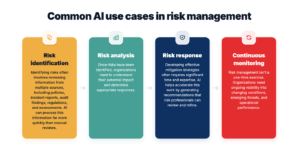
Here are some of the most common enterprise use cases.
Risk identification
Identifying risks often involves reviewing information from multiple sources, including policies, incident reports, audit findings, regulations, and assessments. AI can process this information far more quickly than manual reviews.
Common applications include:
- Detecting emerging risks across business units
- Identifying duplicate or overlapping risks
- Extracting risks from unstructured documents
- Comparing risks across business functions
- Surfacing relationships that may otherwise be overlooked
Risk analysis
Once risks have been identified, organizations need to understand their potential impact and determine appropriate responses.
AI can support this process by:
- Summarizing lengthy risk assessments
- Recommending inherent and residual risk considerations
- Identifying gaps in existing control frameworks
- Highlighting trends across historical assessments
- Prioritizing risks based on available data
Risk response
Developing effective mitigation strategies often requires significant time and expertise. AI helps accelerate this work by generating recommendations that risk professionals can review and refine.
Examples include:
- Suggesting control recommendations for identified risks
- Generating draft control descriptions
- Mapping risks to regulatory requirements
- Recommending mitigation activities
- Supporting remediation planning
Continuous monitoring
Risk management isn’t a one-time exercise. Organizations need ongoing visibility into changing conditions, emerging threats, and operational performance.
AI supports continuous monitoring by:
- Detecting unusual patterns and anomalies
- Monitoring changes in regulations
- Identifying shifts in operational risk
- Summarizing new incidents and investigations
- Highlighting trends across multiple business units
How to choose AI risk management software
As more vendors introduce AI capabilities, it can be difficult to distinguish meaningful innovation from marketing claims. Rather than focusing on whether a platform includes AI, evaluate how well those capabilities support your existing risk management processes.
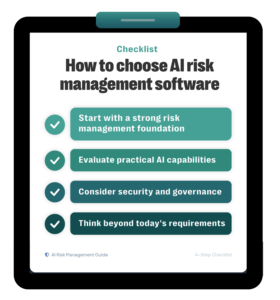
Here are the most important considerations.
Start with a strong risk management foundation
AI is only as effective as the data and workflows behind it. Look for a platform that already provides mature capabilities for:
- Enterprise risk management
- Risk assessments
- Control management
- Incident management
- Regulatory compliance
- Reporting and dashboards
Evaluate practical AI capabilities
The most valuable AI features solve everyday operational challenges.
Look for capabilities such as:
- Natural language processing
- AI-assisted risk assessments
- Control recommendations
- Control generation
- Gap analysis
- Duplicate detection
- Regulatory interpretation
- Intelligent search and semantic matching
- Automated summaries
Consider security and governance
Enterprise organizations need confidence that AI is being used responsibly. Many organizations also align their AI programs with established frameworks, such as the NIST AI Risk Management Framework (AI RMF), or the EU AI Act when evaluating AI governance capabilities.
Ask vendors how they address:
- Data privacy
- Access controls
- Auditability
- Human review of AI-generated outputs
- Regulatory compliance
- Model transparency
- Permission-aware AI
- Source traceability
- Defensible recommendations
Think beyond today’s requirements
Many organizations purchase software to solve an immediate challenge, only to outgrow it a few years later.
Choose a platform that can evolve alongside your program by supporting additional capabilities such as:
- Operational risk
- Compliance management
- Incident management
- Investigations
- Internal audit
- Business continuity
- Third-party risk
An integrated platform reduces future complexity and helps eliminate data silos.
As you evaluate solutions, consider asking:
- How is AI integrated into your risk management workflows?
- What manual tasks does AI automate?
- How are AI recommendations generated and validated?
- Can AI identify duplicate risks or controls?
- How does the platform support regulatory analysis?
- What governance controls exist for AI-generated content?
- Can AI explain why it made a recommendation?
- How does the platform improve over time?
- What integrations are available with our existing technology stack?
Answering these questions provides a stronger perspective into your operational needs and which software can best match your workflow.
Turn risk data into better decisions with Resolver
Resolver helps enterprise risk teams use AI purposefully — applying it to real risk management workflows where it can improve efficiency, strengthen analysis, and provide a clearer view of risk exposure.
By connecting risks, controls, assessments, incidents, and compliance data, Resolver gives teams the context they need to understand how risk is changing across the organization. AI-assisted capabilities help identify gaps and duplicate information, recommend and generate controls, interpret complex requirements, and surface relevant relationships across risk data.
The result is less time spent manually reviewing and reconciling information and more time understanding what it means for the business. Risk teams can strengthen oversight, identify emerging risk signals, and give executives greater confidence in the information used to make strategic decisions.
Resolver keeps human judgment at the center of that process. AI supports analysis and recommendations, while risk professionals maintain the context, oversight, and accountability required to make informed decisions.
If you’re ready to see how AI can help your team build a more connected understanding of risk, explore Resolver’s Risk Management Showcase to see the platform in action.
Frequently asked questions
We’re already using a GRC platform. Why would we need AI capabilities?
Many organizations ask this after investing in a GRC platform.
Traditional GRC platforms do an excellent job of managing workflows, documenting controls, and producing reports. But as your program grows, so does the amount of information your team needs to review. Risk assessments become longer, regulations become more complex, and identifying duplicate risks or control gaps takes more time.
That’s where AI adds value. Instead of replacing your existing processes, it helps your team analyze information faster, surface recommendations, and spend less time on repetitive administrative work. The result is a more efficient risk management program that still relies on human expertise for final decisions.
[H3] Our risk team is small. Is AI risk management software really worth it?
It often provides the greatest value for lean teams.
Imagine preparing for a quarterly risk committee meeting while managing assessments, updating controls, and responding to regulatory changes, all with limited staff. Much of your time is spent reviewing documents, updating spreadsheets, and compiling reports instead of analyzing risks.
AI helps automate many routine tasks by summarizing assessments, identifying duplicate information, recommending controls, and highlighting areas that warrant closer attention. Rather than increasing headcount, organizations can often improve productivity by reducing manual work.
Can AI perform risk assessments automatically?
Not entirely, and that’s a good thing.
Risk assessments require business context, organizational knowledge, and professional judgment that AI cannot replace. However, AI can significantly reduce the time required to complete an assessment.
For example, AI can summarize supporting documentation, recommend relevant controls, identify similar historical risks, and highlight potential gaps. Risk professionals then review those recommendations, validate the results, and make the final decisions based on their expertise.
The most effective platforms position AI as an advisor, not the decision-maker.
How do I know whether an AI feature is genuinely useful or just marketing?
It’s easy to get distracted by flashy demonstrations or AI assistants that generate polished responses.
Instead, focus on practical business outcomes. Ask vendors to demonstrate how AI improves real risk management workflows. Can it identify duplicate controls? Does it accelerate risk assessments? Can it interpret regulations or recommend mitigations? Does it save your team measurable time?
The best AI capabilities aren’t necessarily the most visible – they’re the ones that consistently reduce manual effort while improving the quality of your risk program.
Will AI replace risk managers?
No. Enterprise risk management depends on experience, collaboration, and sound judgment.
Consider a situation where AI identifies an emerging operational risk based on historical trends. It may recommend additional controls or suggest that similar risks have appeared elsewhere in the organization. Those insights are valuable, but they don’t account for business strategy, organizational priorities, or leadership’s tolerance for risk.
Experienced professionals remain responsible for evaluating recommendations, making decisions, and ensuring appropriate governance. AI helps teams work faster; it doesn’t replace accountability.
How long does it typically take to realize value from AI risk management software?
That depends on your organization’s maturity and implementation goals.
Some organizations begin by using AI to improve a single workflow, such as risk assessments or control management, and see efficiency gains relatively quickly. Others take a phased approach, expanding AI capabilities across compliance, operational risk, incident management, and enterprise reporting over time.
The greatest long-term value comes from combining AI with connected enterprise workflows. As more data becomes centralized and processes become standardized, AI has access to richer information and more opportunities to support better decision-making.