

When it comes to risk management, visibility is a crucial component that enables organizations and physical security teams to identify, track, and report potential threats to their operations. Without a clear understanding of incident trends and security risks, mitigating threats and protecting people, places, and assets from preventable incidents becomes more difficult.
Visibility allows organizations to gain a comprehensive, real-time view of their internal and external environments, enabling them to track emerging risks earlier and take proactive measures to manage them — or prevent them altogether.
With robust incident reporting and tracking tools in place, organizations and their security professionals can minimize risk exposure, reduce response times, and improve compliance. A strong incident reporting process ensures critical incidents are captured, analyzed, and addressed before they escalate. Modern AI-powered solutions are now transforming this process by automating intake and triage, allowing security teams to focus on resolution rather than administrative tasks.
Why is incident reporting so important for my organization?
How do you ensure that you have visibility into all security incidents that take place across your organization? While you’re likely aware of the major incidents and threats that could cause business disruptions, minor, unreported incidents could be early warning signs of something more severe, such as:
- Unreported personnel issues — such as harassment — can easily escalate into serious security threats.
- A pattern of lower-level incidents in a specific location may indicate a security gap, leading to more severe risks.
- A seemingly small incident can grow — such as a missing laptop might initially seem like a minor loss, but if it contains sensitive data, it could result in a serious data breach.
The challenge is ensuring all incidents are reported promptly so they can be triaged, reviewed, and acted upon efficiently. When your security team is already stretched thin, how do you capture every incident without adding extra workload?
That’s where the value of an incident reporting portal comes into play. By engaging the broader organization, security teams can streamline the reporting process without putting more strain on internal resources. AI-powered intake tools can further reduce this burden by guiding submitters through smart, contextual questions that ensure complete reports from the start. Even if every submission doesn’t require immediate action, capturing all incidents allows teams to prioritize, analyze, and act on patterns effectively.
There are five key considerations for launching an incident reporting portal.
1. Understand your incident reporting audience & purpose
The key is to start small and be specific. Trying to collect every type of incident from every audience can lead to an overwhelming system with low adoption. The first step is to define who will use the portal and what types of incidents they should report. Is this going to be a tool for employees to report theft? For the public at a university or college campus to report suspicious behavior?
Start small. A system that tries to capture every incident type at once can become too complex and discourage use. Instead, focus on high-priority incidents first and expand as needed. It’s also important to consider who will review these reports. If a report is for internal security teams, it might not require the same level of detail as a report meant for an insurance provider or external investigator.
A well-structured incident report should be neutral, factual, and specific. It should include essential details while avoiding bias or unnecessary assumptions. AI-driven intake agents excel, here. By asking dynamic, contextual questions that adapt based on incident type, they help reporters provide exactly what investigators need without overwhelming them with irrelevant fields.
Learn how a five-stage security maturity model can guide you in growing your organization.
2. Know the pros and cons of anonymous submissions in incident reporting
In a perfect world, we would always know who submitted an incident. But there are tradeoffs that need to be balanced as you choose whether or not your incident reporting portal will be anonymous. It’s important to consider that an incident portal with credentials will allow you to go back to the reporter and ask for additional details. Anonymous incident reporting can encourage more submissions, especially for sensitive incidents. However, it also introduces challenges.
Pros of anonymous incident reporting:
- Generates higher incident volumes by making it easier for people to report sensitive issues.
- Provides insight into organizational security culture and hidden risks.
- Encourages whistleblowing without fear of retaliation.
Cons of anonymous incident reporting:
- Information gaps — it’s difficult to follow up for additional details.
- Higher potential for false reports or misuse.
- Challenges in tracking ongoing issues without identifying repeat incidents.
If your goal is to maximize visibility and capture all incidents, an anonymous portal is often the best choice. However, if follow-up investigations are a priority, a credentialed system — such as one using single sign-on (SSO) authentication for employees — may be more effective. AI-guided intake can help bridge this gap by ensuring even anonymous reports are complete and comprehensive from the first submission, reducing the need for follow-up.
3. Build up your incident tracking technology infrastructure
Once you decide on the type of incident portal to deploy for your organization, you can pick a technology to help get you there. When looking to implement a new incident management software, you need to be aware of the potential risks and your organization’s needs. Here are three common options to help you deploy an incident reporting portal:
- Vendor-Provided Incident Tracking Solutions: If your organization uses vendor risk management software, leveraging its built-in reporting portal is often the most seamless and cost-effective option.
- Company Intranet as an Incident Reporting Solution: Many organizations use their intranet for employee communication. A simple incident submission form can be an easy way to encourage reporting.
- Workflow Tools for Incident Management: If no system is in place, internal spreadsheets can be a low-cost alternative. However, these lack automation and security and often require manual data entry.
Technology is not the make or break for portals. There are several best practices that you can employ in your technology choice that will enable you to improve portal adoption.
- Ease of use in your incident reporting solution: Having a platform that’s both user-friendly and allows for simplified incident reporting is beneficial for security teams who monitor and track incidents, as well as employees who use the tools to report events. There’s a natural trade-off in technology between simplicity and depth of data. Go for something simple and keep the number of fields minimal so your security teams will both track and manage events more efficiently.
- Dynamic forms: Customizable forms can be created for different types of incident reports, as each one requires different information. Users can select the type of form they need and then have it only display what’s relevant to that specific type of incident. AI-powered intake takes this a step further by conversationally guiding users through only the questions relevant to their specific incident, making the process feel natural rather than form-like. After all, asking people to skip irrelevant fields is a common cause of poor-quality data or low completion rates.
- Use plain language: While you may be tracking countless incident categories, you shouldn’t present that to your users. Providing a simplified list with verbiage that users feel comfortable with is ideal. Ask for the pertinent details (when, where, what, etc.) instead of requesting that they provide serial numbers or other details that they may not have readily available, but your security team will.
- Create a narrative: It takes more time and effort to code an incident from free-form text — but it’s your best bet if you want the best quality data. To ensure that users think of all the relevant details, your portal should ask the questions that you would normally ask when receiving a call about the incident like details on what happened and when, as well as pictures or additional information to support the claim. Once the data is in the portal, your trained security professionals can better code incidents to meet your reporting requirements.
Get instant access to our Workplace Investigation Readiness Checklist
4. Create a communication plan for process rollout
Many reporting systems fail because they require too many steps, have unclear instructions, or aren’t well integrated into daily workflows. If employees have to hunt for the portal or struggle to log in, they won’t use it.
Here’s how to make reporting seamless:
- Make it accessible: Place links where employees already work, such as HR systems, Slack, Microsoft Teams, or security dashboards. Embedding the portal in familiar tools reduces friction and encourages reporting as part of daily operations.
- Use single sign-on (SSO): Avoid requiring separate logins, as multiple credentials create unnecessary roadblocks. With SSO, employees can access the portal with their existing work credentials, eliminating extra steps and making it easier to report incidents in real time.
- Keep forms simple: Too many required fields slow down the process and discourage submissions. Only ask for key details and let security teams follow up if more information is needed. Better yet, use AI-guided intake that asks contextual questions in a conversational flow, ensuring reporters provide complete information without feeling overwhelmed.
A well-designed portal should require minimal training and feel as easy to use as sending an email. If the process is complicated or unclear, employees may choose not to report incidents at all, leading to gaps in security awareness. To improve adoption, consider running short internal training sessions, email reminders, or in-platform prompts to show employees how quick and easy reporting can be.
Also read: Top 7 Mistakes in Physical Security Incident Reports
5. Remember to follow up
A reporting system isn’t just about collecting data. It needs to trigger action. If reports sit unanswered, employees will stop submitting them, and security risks will go unnoticed. A structured follow-up process keeps reports moving and helps teams respond faster.
Automation makes it easier to sort reports, prioritize urgent cases, and keep employees informed by:
- Flagging high-priority incidents and send alerts: Not every report requires an immediate response. A lost key card isn’t the same as a physical security threat. Automated workflows can sort reports based on severity and send alerts for urgent issues. Connecting alerts to Slack, Teams, or email ensures security teams see them right away.
- Confirming receipt with an automated response: Employees want to know their reports matter. A simple confirmation email lets them know their report was received and outlines the next steps. If more details are needed, automated follow-ups can request them.
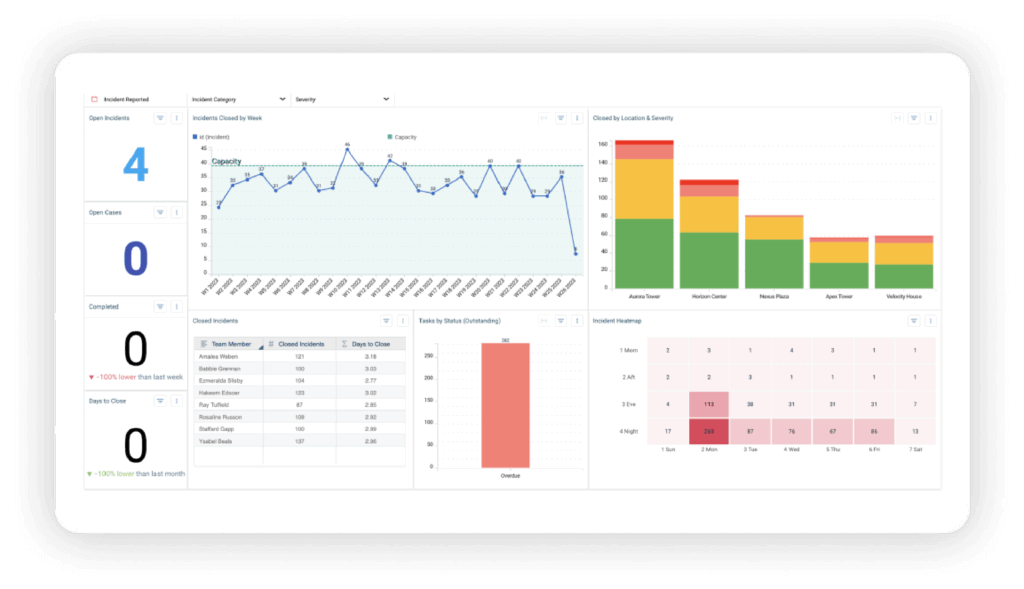
- Using dashboards to track trends: A single report might not reveal much, but patterns tell a different story. A rise in thefts in one location could point to a security gap. Dashboards help security teams spot repeat issues and make informed decisions.
Follow-ups don’t stop with automation. Security teams should close the loop whenever possible. If an employee reports a workplace safety issue, they should hear about the resolution. Even a general update on security improvements can reinforce the value of reporting.
A fast, reliable follow-up process makes employees more likely to report incidents. Automation helps security teams stay on top of reports and respond before small issues turn into bigger problems. By combining AI-powered intake, automated triage, and customizable playbooks, teams can move from report to resolution with unprecedented speed and consistency.
How Resolver Simplifies Incident Reporting and Improves Workflows
Incident reporting shouldn’t be a burden — and with the right technology, it doesn’t have to be. When security teams rely on outdated processes like manual data entry, scattered reports, and delayed responses, incidents slip through the cracks. Resolver’s Incident Management Software eliminates those roadblocks, and our new Automated Intake and Triage capability takes it even further.
Powered by AI, this capability cuts the administrative headaches that slow teams down. An AI-guided Intake Agent ensures every report is complete and structured from the start. An intelligent Triage Agent automatically classifies, tags, and routes incidents so your team skips the sorting and gets straight to action. And customizable Playbooks launch the right response workflows instantly, ensuring consistent, swift action aligned with your SOPs.
The result? Security teams spend less time wrestling with forms and manual triage, and more time actually protecting people and assets. Incidents are captured faster, prioritized smarter, and resolved with the speed and consistency your organization needs.
Request a demo today to see how Resolver’s Automated Intake and Triage capability helps your team report faster, triage smarter, and respond with confidence.
